Installation
You can install the development version of rlstats from GitHub with:
#install.packages("remotes")
#install.packages("devtools")
devtools::install_github("ADC-405-S26/rlstats")
Note: If you’re reading this on the Github source code page, there will be a lot of css jargon that it displays. Scroll past to see the table output.
Examples
This package contains three main functions. Two for analyzing a specific player, and one for comparison between teams in a match. Below you’ll see usage of all three.
stats_for_player
This function outputs a table with some basic summary statistics for a specified player
stats_for_player(TDMZ443games, name = "TDMZ443")| Stats for TDMZ443 | |||||
| Number_of_Ball_Touches | Number_Of_Goals | Number_Of_Saves | Average_Speed | Average_Boost | Percentage_Of_Time_Supersonic |
|---|---|---|---|---|---|
| 68 | 1 | 4 | 51.66 | 54.81 | 16.8% |
If your dataset contains data from several games, the above function call will return aggregated statistics for all those games. If you want to specify a particular game, you pass in its match guid.
stats_for_player(TDMZ443games, name = "TDMZ443", game = '8DF7C4C211F1560E0ED84EA271D83282')| Stats for TDMZ443 | |||||
| Number_of_Ball_Touches | Number_Of_Goals | Number_Of_Saves | Average_Speed | Average_Boost | Percentage_Of_Time_Supersonic |
|---|---|---|---|---|---|
| 45 | 1 | 2 | 52.52 | 54.62 | 17.6% |
speed_boost_plots
This function returns two plots displaying boost total and speed information for a specified player throughout the course of a specified game
speed_boost_plots(TDMZ443games, name = 'TDMZ443', game = '8DF7C4C211F1560E0ED84EA271D83282')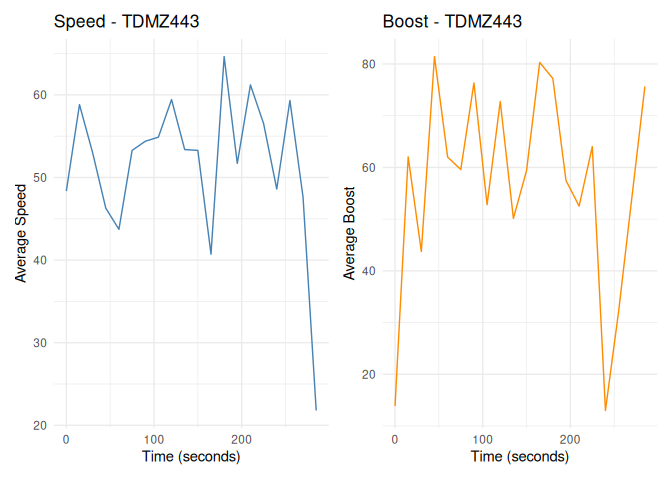
compare_teams
This functions outputs a table with some summary statistics allowing comparison between the performance of both teams in specified match
compare_teams(TDMZ443games, '8DF7C4C211F1560E0ED84EA271D83282')| Stats for teams | |||||||
| TeamNum | Number_Of_Goals | Number_of_Ball_Touches | Number_Of_Shots | Number_Of_Saves | Number_Of_Assists | Number_Of_Car_Touches | Number_Of_Demos |
|---|---|---|---|---|---|---|---|
| 0 | 3 | 124 | 10 | 4 | 3 | 270 | 1 |
| 1 | 1 | 106 | 6 | 5 | 1 | 298 | 3 |